

Verifying your identity
Your ID, your selfie, your address — and what happens next.
How it works4
It takes about two minutes on your phone:
- Tell us where you live, your nationality and your home address.
- Choose the country that issued your document and the type of document.
- Take a photo of your document — it is captured automatically when it is sharp.
- Do a short face check: a few simple moves, drawn at random.
Your face is compared with the photo on your document.
- Passport — the photo page only.
- National identity card — front and back.
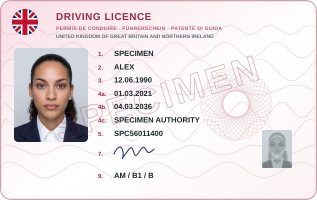
- Driving licence — front and back.
With the Sylmera app, a phone with NFC can also read the chip in your passport — one more check that it is genuine. Some document types may not be accepted for every country of residence; the app tells you before you start. Files must be under 8 MB — JPG, PNG, WebP, HEIC or PDF.
- All four corners inside the frame.
- The document flat, on a dark surface, in good light.
- No glare, no fingers over the text, no blur.
- For your face: look straight at the camera, whole face in the oval, no hat or sunglasses, nobody else in the frame.
You are asked to do a few moves — close your eyes then open them, turn your head left or right. The order is random each time. It shows the photo was taken live, by you. The first time, the page downloads a few megabytes: Wi-Fi helps.
Waiting for a decision5
The automatic checks take a few seconds. Then a person on our team confirms the result — usually within a working day — and we email you either way.
Only that step needs redoing — everything else is kept. For example, if the photo of your document could not be read clearly, you take that photo again.
The email tells you why, in our team’s own words — for example, “the back of the card is cut off, we cannot read the number”. A refused file is not a refusal of your account: you can send new photos straight away.
Yes: three submissions a day. A retake we ask for does not count. If you reach the limit, try again the next day.
No — once sent, it is with our team. If something is wrong, wait for the decision, or tell us.
Your address4
A verified address raises your limits on what you can send, receive and withdraw. It comes after your identity is verified.
A bill, a bank statement or an official letter, in your name, showing the address you gave us, dated less than 3 months ago. A PDF or a photo both work. Before you send, the app tells you if it cannot find the date, your name or your address on the document.
Open Verification in the app and choose “My address has changed”, then send a recent proof of your new address. Your identity stays verified while we check it.
Once your identity is verified, your name is locked. Contact us with a document showing your new name. The name on your account must match the bank accounts you withdraw to.
Your documents and your data2
Your documents are kept outside the public website. Only the people who review them can open them, and every time a member of our team opens a file, it is recorded. We never sell them. See the Privacy policy.
- Allow the camera when your browser asks — or in your browser’s site settings.
- Close any other app that uses the camera.
- If you opened the link inside another app, open it in your browser instead.
- On some Samsung phones: Settings › Security and privacy › Privacy › switch on “Camera access”.